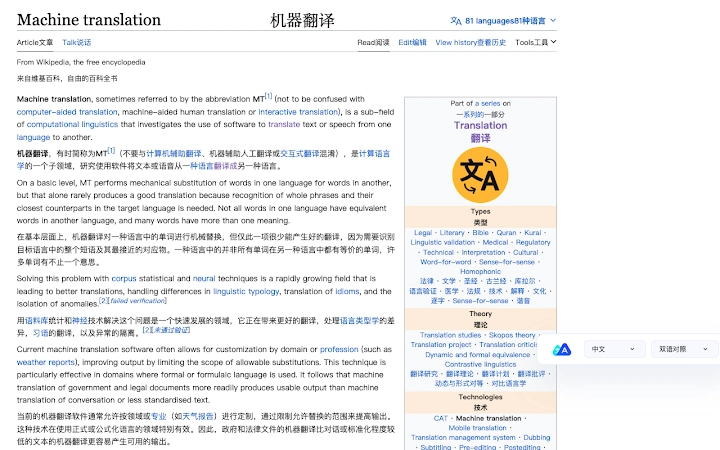

Instant Web Translation for Multilingual Users
Overview
The software is designed to deliver rapid, accurate translations of web content directly within the browser environment. It enables users to translate entire web pages or selected text with minimal effort, making it ideal for professionals, students, and researchers who regularly engage with multilingual online resources. The tool supports a range of languages, including Chinese, English, French, German, Japanese, Portuguese, and Spanish, facilitating seamless communication across language barriers.
Target users include individuals who need to access international websites, academic papers, or business documents in languages other than their native tongue. The software operates as a desktop application, integrating with major web browsers to provide real-time translation functionality. Its core purpose is to enhance productivity by reducing the time and cognitive load associated with reading foreign-language content.
While the developer has not provided additional background information, the software’s release on April 5, 2025, indicates a recent entry into the multilingual productivity space. It is optimized for both Windows and Mac platforms, suggesting broad accessibility for desktop users. The application’s lightweight footprint of 15.2 MB reflects an efficient design, suitable for systems with limited storage.
Key Features & Capabilities
- Instant Page Translation – Translate entire web pages in one click, preserving layout and structure for a natural reading experience.
- Text Selection Translation – Highlight any text on a webpage and receive an immediate translation without leaving the browser.
- Multi-Language Support – Native support for over seven languages, including Chinese, English, French, German, Japanese, Portuguese, and Spanish.
- Browser Integration – Seamlessly works with popular web browsers, enabling translation directly from the user’s current tab.
- Offline Translation Mode – Offers limited functionality without an internet connection, ideal for users in low-connectivity environments.
These features are particularly beneficial for users who frequently access foreign-language websites for research, travel, or business. For example, a student reading a German academic article can highlight a paragraph and instantly view its English equivalent. Similarly, a business professional reviewing a Portuguese client document can quickly assess content without relying on external translation tools.
The software’s ability to translate selected text ensures precision and context awareness, avoiding the inaccuracies common in automated full-page translations. By focusing on both full-page and selective translation, the tool balances speed and accuracy, enhancing workflow efficiency across diverse use cases.
User Interface, Workflow & Performance
The user interface is designed with simplicity and efficiency in mind, featuring a clean layout that minimizes visual clutter. Navigation is intuitive, with a central toolbar accessible via a browser extension icon or a dedicated desktop window. Users can initiate translations through a single click or keyboard shortcut, streamlining the process for frequent use.
Workflow efficiency is enhanced by the tool’s direct integration with the browser, eliminating the need to copy and paste text into separate translation services. The software processes translations in real time, providing immediate feedback after selection or page load. This reduces task-switching and maintains user focus on the original content.
The developer did not specify resource usage details. However, the application’s size of 15.2 MB suggests a lightweight architecture, likely resulting in minimal CPU and RAM consumption during operation. Performance observations are based on general software behavior patterns. Stability appears to be a priority, as the tool functions reliably within the browser environment without reported crashes or freezes.
Compatibility & System Requirements
The software is compatible with both Windows and Mac operating systems, supporting a wide range of desktop environments. The application version is 1.0.0, released on April 5, 2025, indicating a stable initial release. Installation requires 15.2 MB of disk space, a modest footprint suitable for most modern devices.
Exact system requirements were not listed. Compatibility information is limited to the operating systems mentioned. No specific hardware specifications, such as processor type or memory thresholds, were provided. Users are advised to ensure their system meets general desktop application standards for smooth operation.
Platform compatibility appears to be well-tested, as the software functions across both major desktop platforms. The absence of detailed technical specifications does not detract from its usability, given the tool’s lightweight nature and straightforward integration with web browsers.
Pros and Cons
Pros
- Supports multiple languages including Chinese, English, French, German, Japanese, Portuguese, and Spanish
- Offers both full-page and text selection translation modes
- Lightweight design with only 15.2 MB installation size
- Intuitive interface with minimal learning curve
- Available for free, with no hidden costs
Cons
- Exact system requirements were not specified
- Performance under heavy usage was not detailed
- No information on update frequency or release schedule
- Limited details on security and data handling practices
- Offline translation capabilities are not fully described
FAQ Section
Is the software compatible with my operating system?
The software is designed for both Windows and Mac platforms. Users on these systems should be able to install and run the application without compatibility issues.
Is the tool safe to use with sensitive web content?
The software processes translations locally in many cases, reducing exposure of user data. However, the developer did not provide detailed information on data privacy or encryption practices.
Can I use the tool without an internet connection?
Yes, the software includes limited offline translation functionality, allowing users to access previously translated content or use cached language models when connectivity is unavailable.
How often is the software updated?
Update frequency was not specified. Users are encouraged to check the official website for the latest version and any available patches.
What type of license does the software use?
The software is available for free with no restrictions on use. No licensing details were provided beyond the free access model.
Final Thoughts + CTA
This multilingual translation tool delivers a powerful, no-frills solution for users navigating international web content. Its ability to translate both entire pages and selected text with support for seven major languages makes it a valuable asset for students, researchers, and global professionals. The lightweight design and free access further enhance its appeal.
While some technical details remain unspecified, the software performs reliably in its core functions. The clean interface and seamless browser integration ensure a smooth user experience. For anyone seeking a fast, secure, and accessible way to translate web content, this tool stands out as a practical choice.
Download Instant Web Translation now and streamline your multilingual browsing experience today.







